


As someone who's spent the better part of a decade travelling, I've dealt with many of the joys and pains of travel, and in the process tested a lot of the apps made for managing a trip, solo or in a group. This experience has gotten me very familiar with the tools that actually hold up on the road, from TripIt to organize confirmation emails, Wanderlog to visualize your planning and routes, SplitWise to handle expenses in a group, and more spreadsheets and group chats than I care to admit.
After one too many stressful trips, where I was the only one who knew what was happening, I built WaySide to be the bedrock on which I could plan and coordinate any trips. WaySide is a group travel planner built specifically for the person who organizes the trip. It combines itinerary management, multi-currency expense splitting, group chat, email parsing and a trip-aware AI assistant in a single app.
So yes, I'm biased, I built this app for my own travelling style, but in this article, I intend to give TripIt and Wanderlog full credit where they deserve it, as I know these apps better than most.
Summary of Category Winners
Itinerary Building (Pre-Trip Planning) → Wanderlog: The best app for collecting places you're interested in, building routes on a map, and reorganizing plans before you leave.
Itinerary Building (During & After the Trip) → WaySide: Three view modes, lodging gap detection, and an AI assistant that knows your actual plans make it the stronger tool once you're on the road.
Group Collaboration → WaySide: One-tap join links, shared editing, view-only access for family, and an in-trip group chat mean your whole trip lives in one place.
Email Import & Booking Detection → TripIt: The simplest setup: one email address for all your confirmations, with free Gmail inbox scanning included.
Budgeting & Expense Splitting → WaySide: The only app of the three with multi-currency settlement, flexible splitting options, and simplified repayment in a single currency of your choice.
Flight Tracking & Monitoring → TripIt: Airport maps, baggage claim info, fare drop alerts, and alternative flight suggestions make TripIt the clear choice for flight-heavy travelers.
Maps & Visual Planning → Wanderlog: Color-coded maps, day and category filters, and a route optimizer built for planning make Wanderlog the best visual planning tool.
AI Assistant → WaySide: The only trip-aware AI of the three; it knows your itinerary, your group, and your interests, so it can actually help rather than just answer generic questions.
Offline Access → WaySide: Full offline access to your itinerary, documents, budgets, and notes is free on WaySide; TripIt and Wanderlog lock it behind their Pro plans.
Pricing & Value → WaySide: The lowest annual price of the three at $34.99/year, the only app with a monthly plan at $5.99/month, and a group premium model where one subscription extends key features to everyone in your trip.
TripIt: Strengths and Weaknesses
Strengths:
- Automatically scans your inbox for emails to import into your trip
- Best flight tracking, offering airport maps and baggage claim info and even warns you if your flight costs drop
Weaknesses:
- Dated UI
- No budgeting tools
- Lack of AI chatbot
Wanderlog: Strengths and Weaknesses
Strengths:
- Best map view of your trip
- Great for planning, can build a list of things you're interested in, and plan routes using their intuitive map view, and research hotels and attractions in-app
- Great for re-organizing plans and routes, things aren't set in stone once you add them
Weaknesses:
- Barebones AI chatbot with no real knowledge of your trip or preferences
- UI can be cluttered on mobile, feels built more for desktop use before the trip, than active mobile usage during your travels
- Can take a while to login and start planning as a group, long onboarding and difficult to learn UI
WaySide: Strengths and Weaknesses
Strengths:
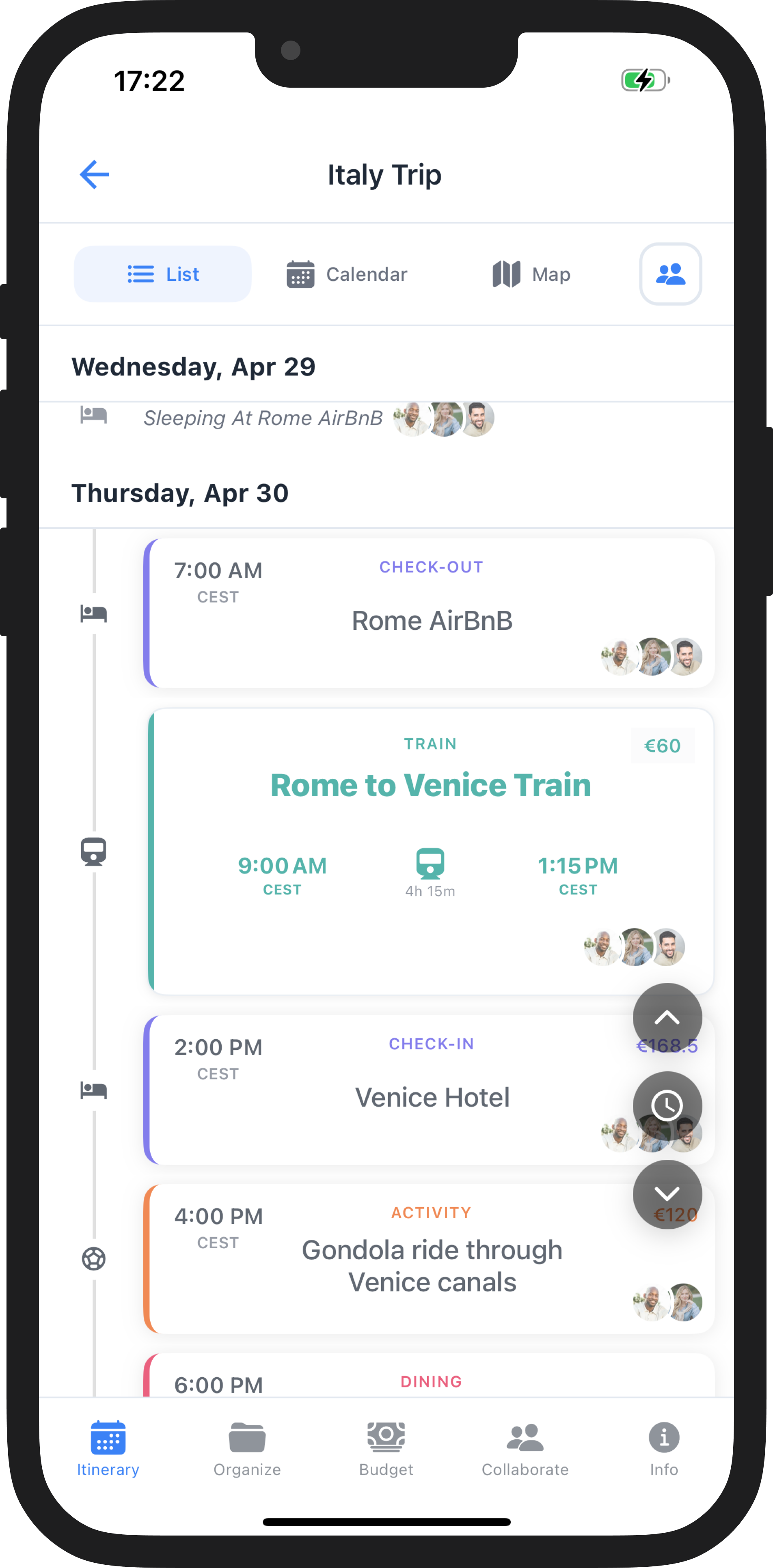
- Three way to view your itinerary, with list, calendar, and map views for every day of your trip, allowing you to see your own trip in any way you prefer. The calendar can make sure you have enough time between activities, and the map can help make sure the distances between items is realistic.
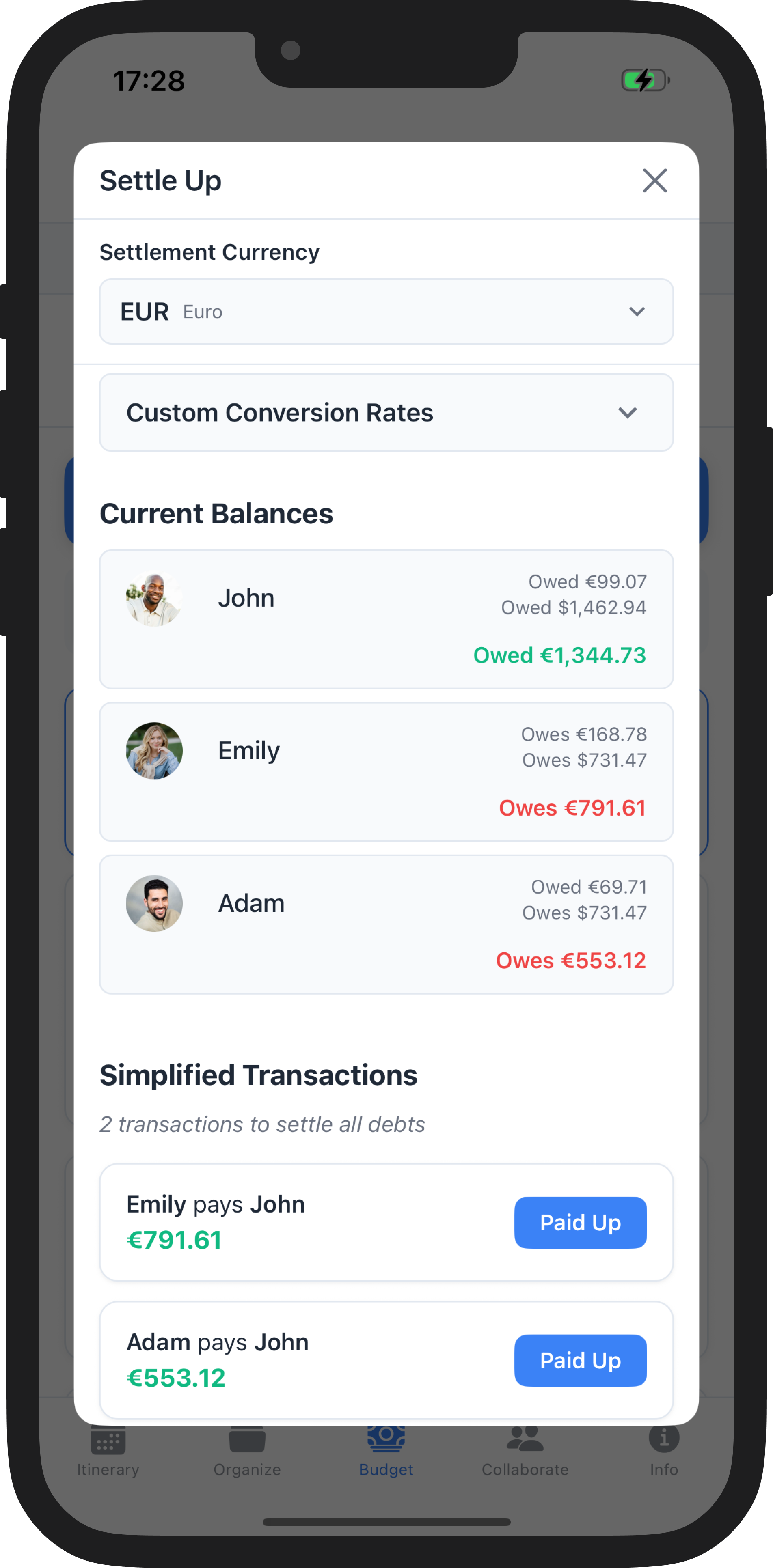
- Best expense handling and splitting. Allows tracking of multiple currency settlements, allowing a single easy repayment in any currency of choice, regardless of how many different currencies you spent in. You can even set custom exchange rates to match the actual value you got in exchanging currencies.
- Best trip aware chatbot. Not a generic chatbot, WaySide's AI assistant has full knowledge of your interests, your group, and what you've already seen or planned.
- Easy to create a trip, drop a link in your group chat, and get started with planning as a group with no delay, even if your friends don't have the app yet.
Weaknesses:
- Not as easy to re-organize plans as Wanderlog. For flexible planning, Wanderlog is king
- Not as many flight tracking and rebooking features as TripIt
- No way to book hotels or attractions in-app, its more of a tool to manage existing plans, not make them from scratch
Itinerary Building and Organization
All three apps were built to keep a detailed itinerary of all your plans. Each item can hold a location, start and end times, and any associated documents. In all three, you can add hotels, bus tickets, flight information, and any attractions you're planning on checking out.
TripIt: Has a day by day view of all your items from the starting date to the ending date in chronological order.
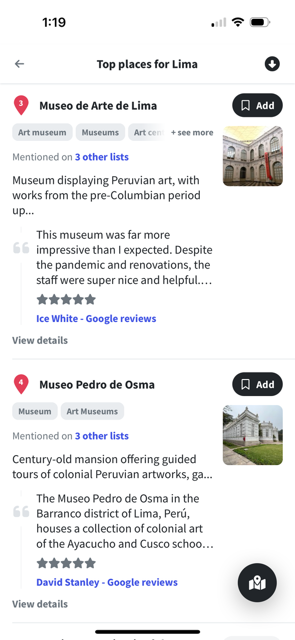
Wanderlog: Has a day by day view of your items, as well as a robust map view of your plans, which you can filter by day or category. It is incredibly easy to reorganize plans by shifting their order around in your itinerary. It also lets you save a list of places you're interested in checking out in a location, and easily implementing those into your itinerary, alongside top recommendations for any given location.
WaySide: Has a day by day list view of your items, a map view that shows all the locations planned for any given day of your trip, along with a calendar view, for a more zoomed out view of your trip.
Winner: A tie between Wanderlog and WaySide.
Pre-Trip Winner: Wanderlog offers a lot of features for planning prior to a trip, allowing users to collect places they might be interested in, and adding it into your itinerary, and re-ordering things quickly and more easily.
During-Trip Winner: WaySide requires times for all items, so it's not as simple to modify plans, but when you're on the road, WaySide offers 3 different ways to look at your itinerary, and an AI assistant capable of offering suggestions to fill in gaps or notice issues.
I tend to prefer Wanderlog for collecting places before a trip, and WaySide for actually going on that trip.
Group Collaboration
Travelling with a group, it's essential to make sure everyone's on the same page, and has access to all the necessary boarding tickets, details and locations.
TripIt allows you to share your travel itinerary with people to track updates on your itinerary, or see a view only version of it.
Wanderlog also has group collaboration features, allowing the sharing of a view only version of your itinerary, with selectable visibility for various travel details. You can also invite all other travelers into a group to edit and add things to a shared itinerary. Just drop a link into your group chat, or add them by email.
WaySide's group collaboration features also allow for a shared itinerary, with a live view of the same travel details in list, calendar, or map views. Similar to Wanderlog, it allows invitation through a join link, or through the user's username. Users can be added as viewers or editors, so you can share your trip both with your fellow travelers, and anxious family back home. Additionally, WaySide also has an in-trip group chat, so you can ditch the group chat entirely, and communicate exclusively through the app itself. This makes collaboration for a trip a breeze, everything you need to coordinate a group trip in a single app.
Additionally, with WaySide Pro, all members of any trip you're a part of will receive Pro benefits like location sharing, unlimited attachments, flight tracking notifications and custom notifications on any itinerary item. So your whole group trip only needs on premium subscription.
Winner: WaySide
WaySide offers the most features for ditching all other apps like SplitWise, your group chat, and that one excel sheet you all pass around. You can handle most of your trip communications within the app.
Email Import and Booking Detection
Wrangling with your inbox at a border security checkpoint is always a hassle. All three apps allow some form of email to itinerary handling.
TripIt, allows users to send all their emails to a single email address, which will extract all the useful details, and allow users to add that item to one of their trips. It also lets you connect your gmail inbox for auto-scanning to import any useful details automatically.
Wanderlog, creates a mailbox per trip, allowing users to email all booking details for that particular trip into that trip automatically. Wanderlog Pro allows users to scan their Gmail inbox automatically for items.
WaySide allows users to create a mailbox for themselves. Any emailed items to that inbox can be imported into any trip. It uses AI for reading the emails, so its results tend to be the most accurate of the three. However, it doesn't have any inbox scanning functionality.
Winner: TripIt
TripIt offers the most email features completely for free, making it the easiest and cheapest app for setting up an itinerary up with just emails.
Budgeting and Expense Splitting
For most people, a vacation can be one of the biggest expenses in a year, so keeping track of your expenses both as an individual and as a group can be crucial to the success of any trip.
All 3 apps allow some tracking of expenses.
TripIt can handle a manual cost entry per item, but there's no central location to view all of your costs for a trip.
Wanderlog allows the setup of an individual budget, and breaks down spending by category. It also has some splitting functionality in a group trip with multiple participants who may owe for some item. However, the splitting functionality is very simple, not allowing anything but an even split amongst participants of a trip.
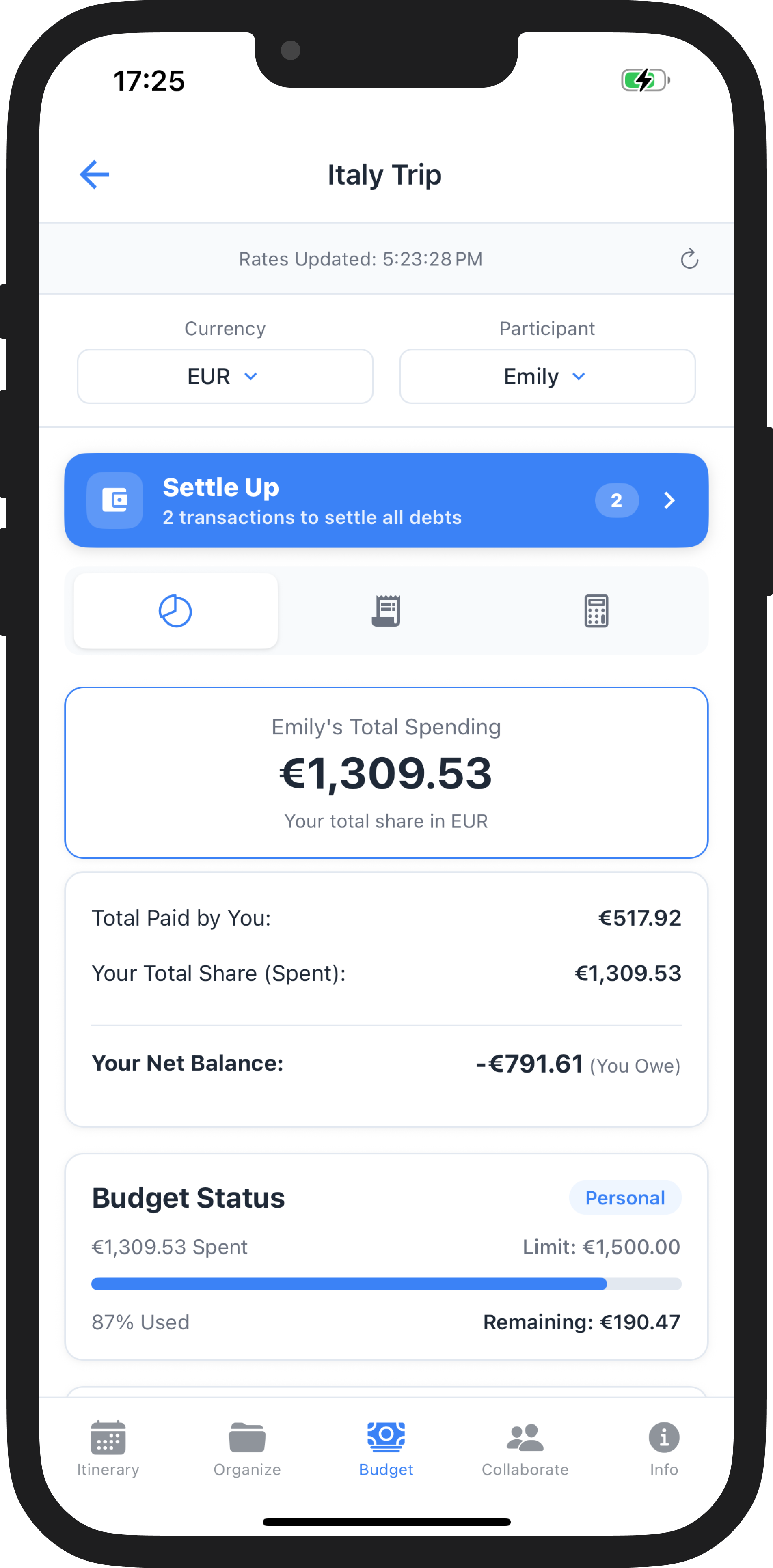
WaySide, also allows the setup of both an individual budget, and a trip-wide budget. It will show you your spending based on category, and track who owes who money.
It has a robust splitting interface, allowing for uneven splits, set by absolute amounts, percentages, or shares. It also has quick select buttons for simpler scenarios like "I paid" and "Everyone split equally". At the end, WaySide gives users a simplified repayment strategy using the fewest possible transactions in a single currency of the user's choosing, instead of separate settlements per currency used.
Winner: WaySide
WaySide is the only one of the three which offers complex expense handling, so you no longer need a SplitWise alongside any other travel management tools you use. Also, it can simplify all your transactions to be paid off in the least amount of transactions in a single currency.
Flight Tracking and Monitoring
TripIt, Wanderlog, and WaySide all give you real-time notifications if your flight is delayed, cancelled, or if any changes occur in your gate or terminal. It's a premium feature in all 3 apps.
TripIt offers a ton of additional features surrounding tracking flights, including fare trackers for pro members, letting you know if a flight drops in price from your purchase, airport maps to help you find your way around, baggage claim information, and resources for finding alternate flights in case delays or cancellations cause your plans to change.
Wanderlog, allows pro members to also receive notifications on the delay of a flight.
In WaySide, if a single user in a trip has WaySide pro, all members of the trip, get push notifications to remind users to check-in 24 hours before the flight, a final reminder notification 4 hours before with the latest gate and terminal information, as well as notifications for any last minute changes.
Winner: TripIt
TripIt Pro is the best way to track any flight details, and hear back about any better deals or seats available.
Maps and Visual Planning
Whenever planning a trip, laying all the locations on a map can help make sense of a lot of things you can't see in a list. It can help you find and group items which are close together and make choices in terms of the order in which you see sites.
TripIt has a very simple map view, in which you can see all your items with places laid out in a map. Clicking on one of them, can open your preferred mapping app, leaving you to find out details and directions outside of the app.
Wanderlog is built around map based planning. It has map filters, allowing you to see your map for a specific date or category. It includes directions between stops, and allows Pro users to optimize their route for a given day, to make for efficient and sight filled routes.
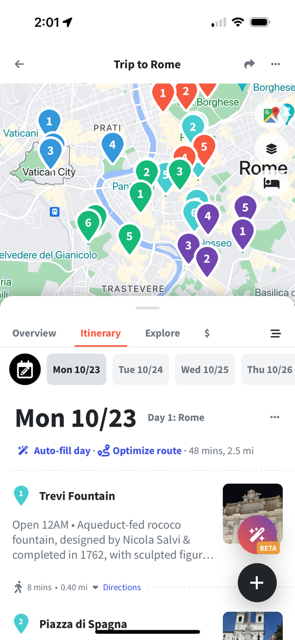
While WaySide has some features for mapping during a trip, Wanderlog's extensive feature set around mapping and planning allows for a lot of flexibility and options while planning a trip.
WaySide offers a comprehensive map view alongside its list and calendar views. It lets users see a day-by-day view of pins associated with the locations of a given date. It shows routes for any transport items, between the start and end points, and allows for location sharing between trip members, so you never lose your group.
Winner: Wanderlog
AI Assistant
With AI chatbots getting more and more sophisticated, a travel assistant built into any travel app is a natural way to understand your plans, make changes, or get recommendations based on your interests, what you've already seen, and any other considerations you'd like an assistant to deal with.
TripIt has no AI assistant in their app.
Wanderlog has a very simple AI assistant in their app, which doesn't have access to your planned trip data.
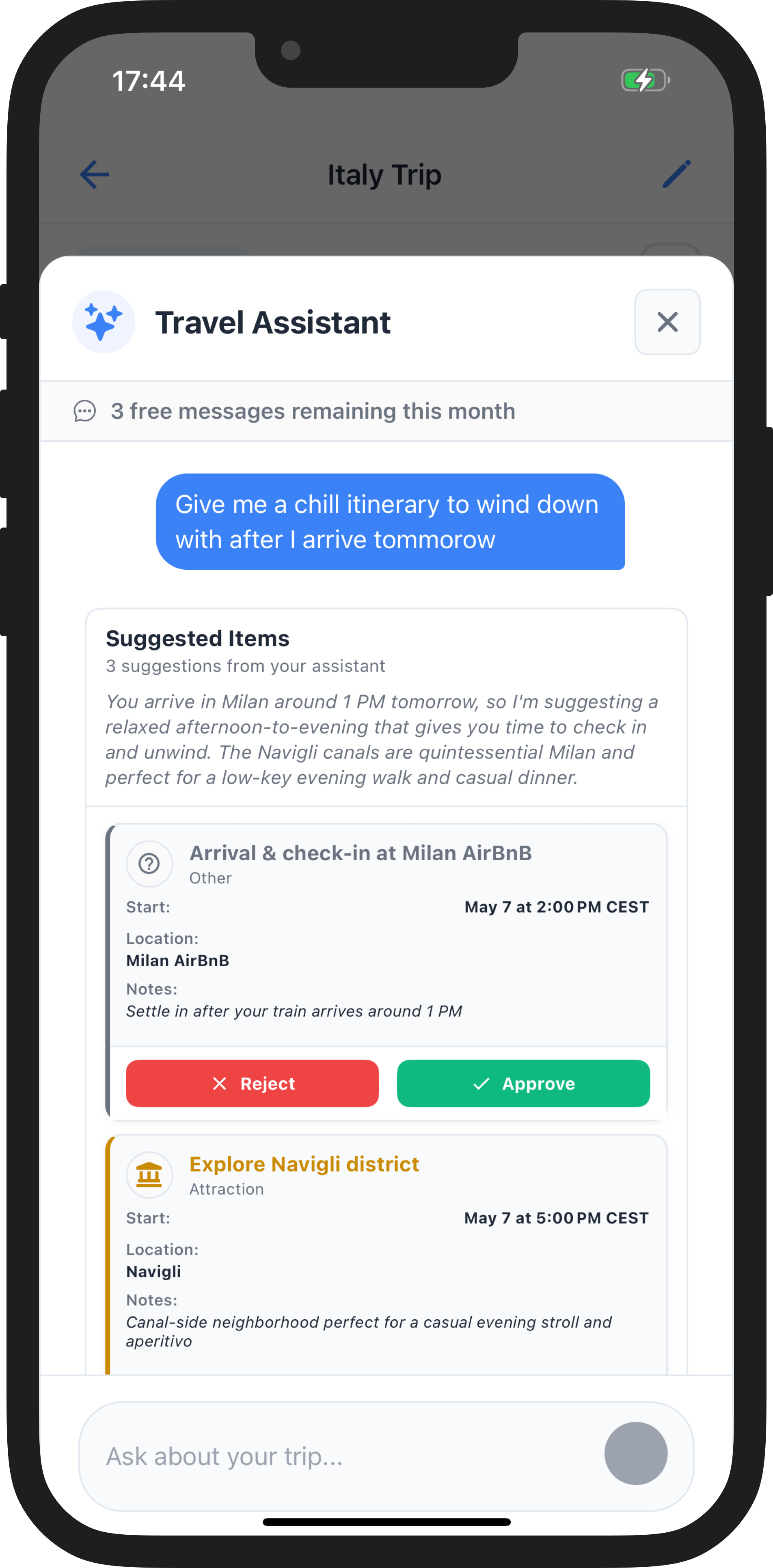
WaySide has a robust, intelligent AI assistant, which has all the information of your trip. Where you're staying, who you're travelling with, and everyone in the group's general interests, along with what's been planned already.
Ask it for advice on what to do with an empty day, how to find any information within the app, how much money you owe to your friends, or any question you can think of. It's a fully functional, intelligent secretary, so you can focus more on the enjoyment, and let WaySide handle all the details.
Winner: WaySide
While Wanderlog does have an AI assistant, WaySide's AI offers more functionality, with its ability to help users navigate the app, recommend items to do which can get added straight into your itinerary, or anything else you'd need.
Offline Access
Travel can be unpredictable, you never know when your e-sim won't work, or you get caught underground, and you need some critical booking ticket while the Wi-Fi or data isn't connecting. Offline access of your travel information is crucial to a reliable travel app.
All three travel apps have offline functionality, allowing you to see your itinerary and associated documents offline.
However, Wanderlog and TripIt have this feature as part of their Pro package. So TripIt Pro for $49/year, and Wanderlog Pro for $39.99/year to gain access to your itinerary and documents while offline.
WaySide offers full offline access to all your travel itinerary details, documents, to-do lists, and notes, with full budget breakdowns while offline, all completely free!
Winner: WaySide
Pricing and Value
All three of the apps, have a ton of features in their free versions, allowing most baseline functionality surrounding building and viewing your itinerary with a few attachments. However, all three also have Pro versions, with several additional features included.
TripIt Pro:
$49.99/year
TripIt Pro has one annual offer at $49.99/year with no monthly offerings. With it, you get a host of flight tracking features, like seat and fare trackers, check in reminders, travel points trackers, unlimited documents, and offline mode.
Wanderlog Pro:
$39.99/year
Wanderlog has an annual offer at $39.99/year with no monthly offerings. With it, you gain a host of flight and car rental deals and tracking, unlimited documents, the ability to optimize your route, dark mode, and unlimited AI assistance.
WaySide Pro:
$34.99/year
$5.99/month
WaySide has an annual offer at $34.99, and a monthly offering at $5.99. It's the only app of the three to offer a monthly offer, which is a huge help when you only travel maybe 1-2 times a year. It gives you unlimited email parsing, unlimited documents, unlimited AI assistant usage, flight tracking, and the ability to share your location in the in-app map view with everyone you're travelling with. Additionally, most AI features, including custom notifications and flight tracking, unlimited attachments, and location sharing just require a single member in your group to have premium. One member buys, everyone benefits!
Winner: WaySide
Overall Verdict: TripIt vs Wanderlog vs WaySide
The best flight tracker: TripIt
The best map based planner: Wanderlog
The best all around travel assistant: WaySide
A lot of which app will work better for you comes down to preferences.
Of course, as I developed WaySide, I'm partial to its features and do prefer it for all of my travelling needs.
All three apps do a good job of organizing all your reservations, documents, and any additional details you'd like to remember about them, and if that's all you want, you can't go wrong with any of them.
If you want the best flight tracking features, TripIt Pro is the way to go.
If you want to be able to send every location you might be interested in, to one place, and make a plan accordingly, Wanderlog is the best option.
If you want to manage a trip with a lot of details, currencies, and/or people, WaySide is the best option, as it has the most comprehensive feature set, the best group collaboration including many premium features if even a single member of the trip has premium, and a highly intelligent and helpful AI assistant.
Frequently Asked Questions
What is the best app for planning a group trip?
WaySide is the strongest option for group trips. It combines a shared itinerary, in-trip group chat, multi-currency expense splitting, and a one-tap join link so your whole group can be in the same app within seconds. It also has a group premium model where one Pro subscriber extends flight notifications, AI assistant access, and location sharing to everyone in the trip. One member goes Pro, everyone benefits!
Is WaySide free?
Yes. WaySide's core features are free, including the shared itinerary, group collaboration, expense tracking, offline access, to-do lists, notes, and document storage. WaySide Pro ($5.99/month or $34.99/year) adds unlimited AI assistant usage, unlimited email parsing, flight monitoring, and location sharing. WaySide is the only app of the three to offer a monthly plan, which makes it a practical option if you only travel once or twice a year.
How does WaySide compare to TripIt?
TripIt is the stronger choice for flight tracking. It offers fare drop alerts, airport maps, baggage claim info, and alternative flight suggestions that WaySide doesn't match. However, WaySide covers significantly more ground for group travelers: multi-currency expense splitting, group chat, a trip-aware AI assistant, and free offline access are all features TripIt either doesn't offer or locks behind its $49.99/year Pro plan.
How does WaySide compare to Wanderlog?
Wanderlog is the better pre-trip planning tool, with a visual map interface that makes it easy to collect places, build routes, and reorganize plans before you leave. WaySide is the stronger choice once a trip is underway. It handles group expenses across multiple currencies, includes an in-trip group chat, and has an AI assistant that understands your actual itinerary rather than answering generic questions. Wanderlog's expense splitting is also limited to even splits, while WaySide supports custom splits by amount, percentage, or shares.
Does WaySide work on both iPhone and Android?
Yes. WaySide is available on both iOS and Android. This makes WaySide the natural alternative for Android users looking for a Tripsy equivalent.
What happened to TripCase?
TripCase shut down in 2025. If you're looking for a TripCase alternative, WaySide covers the core use cases: Confirmation email import, shared itineraries, flight notifications, and document storage, alongside group expense splitting and an AI assistant. TripIt is also a natural alternative if your main need is organized confirmations and flight tracking.
What is the best free travel planning app?
It depends on what you need. Wanderlog has the strongest free tier for solo or visual planning, with maps, recommendations, and basic expense tracking all available without paying. WaySide offers the strongest free tier for group travel, including shared itineraries, group collaboration, expense splitting, and offline access at no cost. TripIt's free version is more limited, with the most useful features like flight alerts sitting behind its Pro plan.